Welcome to my page :)
- Chapter 10
Introducing CSS
- What CSS does
- How CSS works
- Rules, properties, and values
In this section, we will look at how to make your web pages more attractive, controlling the design of them using CSS.
CSS allows you to create rules that specify how the content of an element should appear. For example, you can specify that the background of the page is cream, all paragraphs should appear in gray using the Arial typeface, or that all level one headings should be in a blue italic, Times typeface.
Once you have learned how to write a CSS rule, learning CSS mostly involves learning the different properties you can use. So this chapter will:
● Introduce you to how CSS works
● Teach you how to write CSS rules
● Show you how CSS rules apply to HTML pages
The remaining chapters in this section will look at all of the various CSS properties you can use.
Understanding CSS: Thinking Inside the Box
The key to understanding how CSS works is to imagine that there is an invisible box around every HTML element.
On this page, you can see a basic HTML page.

You can see the same HTML page, but I have added outlines to each of the elements so that you can see how CSS will treat each element as if it lives inside its own box.
BLOCK & INLINE ELEMENTS
-
You may remember from pages 185-186 that in there is a difference between block level and inline elements and how browsers display them.
-
Block level elements look like they start on a new line.
Examples include the < h1 > - < h6 >, < p > and < div > elements.
- Inline elements flow within the text and do not start on a new line.
Examples include < b >, < i >, < img >, < em > and < span >.
CSS allows you to create rules that control the way that each individual box (and the contents of that box) is presented.

In this example, block level elements are shown with red borders, and inline elements have green borders.
The < body > element creates the first box, then the < h1 >, < h2 >, < p >, < i >, and < a > elements each create their own boxes within it.
Using CSS, you could add a border around any of the boxes, specify its width and height, or add a background color. You could also control text inside a box — for example, its color, size, and the typeface used.
Example Styles
- BOXES
Width and height Borders (color, width, and style) Background color and images Position in the browser window.
- TEXT
Typeface, Size, Color, Italics, bold, uppercase lowercase, small-caps.
- SPECIFIC
There are also specific ways in which you can style certain elements such as lists, tables, and forms.
CSS Associates Style rules with HTML elements
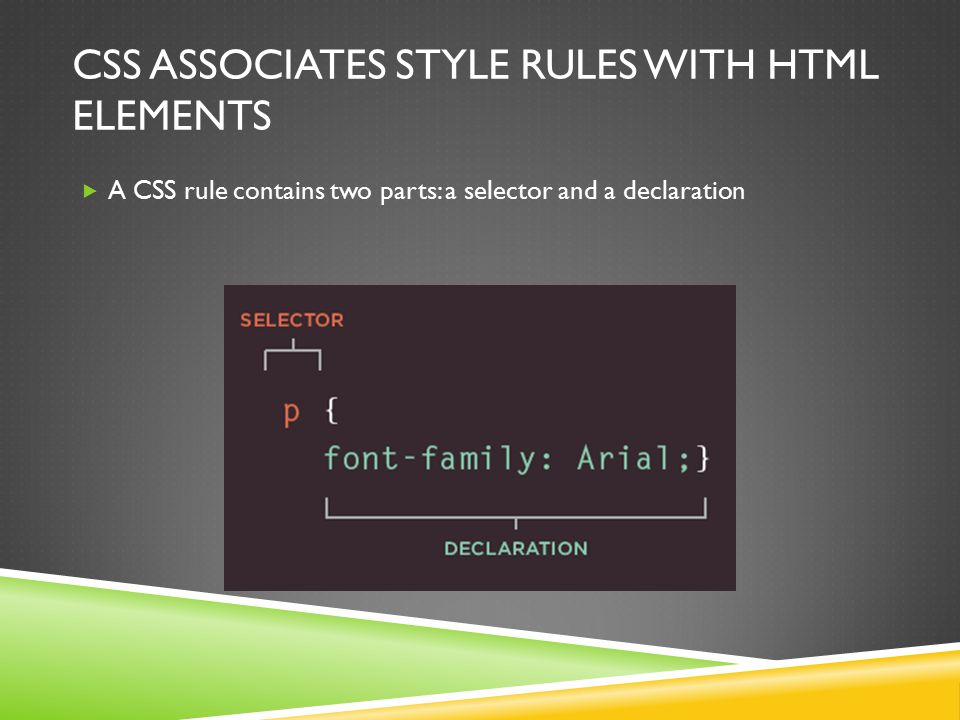
CSS works by associating rules with HTML elements. These rules govern how the content of specified elements should be displayed. A CSS rule contains two parts: a selector and a declaration.
This rule indicates that all < p > elements should be shown in the Arial typeface.
Selectors indicate which element the rule applies to. The same rule can apply to more than one element if you separate the element names with commas.
Declarations indicate how the elements referred to in the selector should be styled. Declarations are split into two parts (a property and a value), and are separated by a colon.
CSS Properties Affect How Elements Are Displayed

CSS declarations sit inside curly brackets and each is made up of two parts: a property and a value, separated by a colon. You can specify several properties in one declaration, each separated by a semi-colon.
This rule indicates that all < h1 >, < h2 > and < h3 > elements should be shown in the Arial typeface, in a yellow color.
Properties indicate the aspects of the element you want to change. For example, color, font, width, height and border.
Values specify the settings you want to use for the chosen properties. For example, if you want to specify a color property then the value is the color you want the text in these elements to be.
Example
INTRODUCING CSS
Here you can see a simple web page that is styled using CSS.
This example uses two documents: the HTML file (example.html) and a separate CSS file (example.css). The fifth line of HTML uses the < link > element to indicate where the CSS file is located.
On the next page, you will see how CSS rules can also be placed in your HTML pages and we will discuss when you might want to do this.
< !DOCTYPE html > < html > < head > < title >Introducing CSS< /title > < link href=”css/example.css” type=”text/css” rel=”stylesheet” / > < /head > < body > < h 1>From Garden to Plate< /h1 > < p >A < i >potager< /i > is a French term for an ornamental vegetable or kitchen garden … < /p > < h2 >What to Plant< /h2 > < p >Plants are chosen as much for their functionality as for their color and form … < /p > < /body > < /html >
body { font-family: Arial, Verdana, sans-serif; } h1, h2 { color: #ee3e80; } p { color: #665544; }
To learn more about Chapter 10 - Introducing CSS & Chapter 11 - Color Visit